# Auto OCO Brackets

### What are the Auto-OCO Bracket Orders?

Built for precision, flexibility, and control, these order-based brackets allow you to set take-profit (TP) and stop-loss (SL) orders tailored to each individual trade entry — giving you the power to scale in, scale out, and manage risk per strategy, per account. The Auto OCO brackets will allow your TP/SL orders to be applied per each individual order entry into the market.

<figure><img src="https://2549854448-files.gitbook.io/~/files/v0/b/gitbook-x-prod.appspot.com/o/spaces%2Ffj55gt7IahlmBVVgmbnQ%2Fuploads%2FwoUeARV5M8vz2wI70LwU%2FGIF%20Recording%202025-09-21%20at%205.24.10%20PM.gif?alt=media&#x26;token=b0560ad2-a3c4-4451-b5f0-6e070521ea76" alt=""><figcaption></figcaption></figure>

### What is the difference between Position Brackets and Auto-OCO Bracket Orders?

<table><thead><tr><th width="190.7578125">Feature Overview</th><th>Position Brackets (Position-Bsed)</th><th>Auto OCO Brackets (Order-Based)</th></tr></thead><tbody><tr><td>Ease of Use</td><td><p>Simple, easy to use by default</p><p><br></p></td><td>Designed for advanced control and flexibility</td></tr><tr><td>Scaling In Behavior</td><td>Auto-aggregates TP/SL orders to average entry price when scaling in</td><td>TP/SL are linked to the individual  entry order price - no forced averaging</td></tr><tr><td>Scaling Out Behavior</td><td>Automatically cancels matching portion of TP/SL</td><td>Supports multiple TP/SL targets at different price levels</td></tr><tr><td>Stop Order Type</td><td>All Stop Loss orders will be Stop Market order types</td><td>Trailing Stop, Auto Break-even, and Stop Limit orders Coming Soon!</td></tr><tr><td>Saved Bracket Strategies</td><td>1 Setup per account</td><td>Save and name multiple bracket strategies</td></tr><tr><td>Brackets on Working Limits / Stop Orders</td><td>Cannot view the TP/SL orders on working Limit/Stop orders until executed</td><td>Visual overlay of suspended TP/SL before execution</td></tr><tr><td>Risk of Leftover Orders</td><td>None due to auto-cancel logic</td><td>Must manage bracket orders manually</td></tr><tr><td>Best for</td><td>Traders who are looking to set it and forget it - less hands on attention and management of working orders.</td><td>Scalpers and/or traders who want multiple TP/SL orders per individual entry orders and are actively monitoring their working orders.</td></tr></tbody></table>

### How to Enable Auto-OCO Brackets

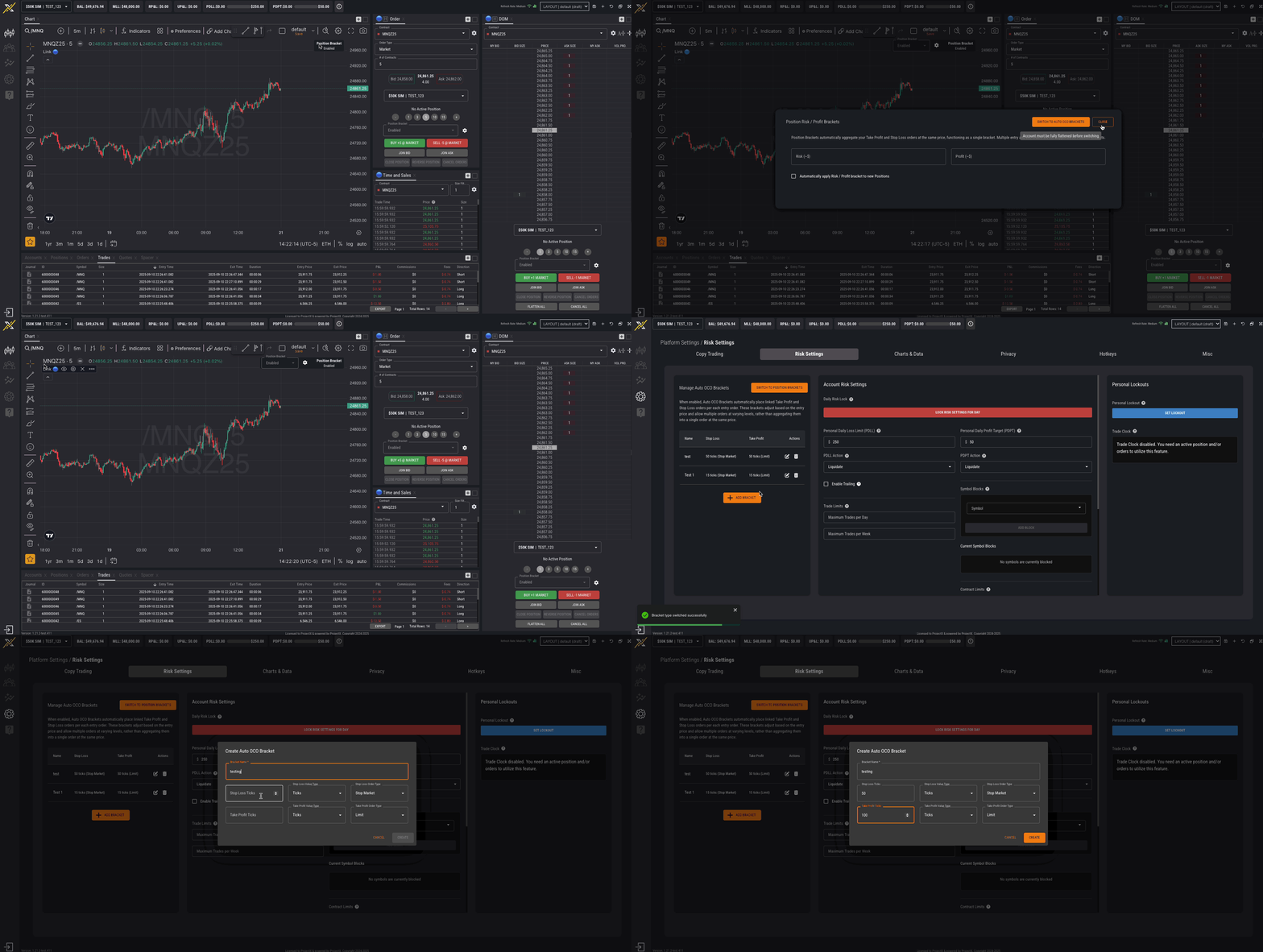
The Bracket type can be switched from the Settings and/or each order entry component (i.e., Chart, Order Card, DOM)

1. Go to: Settings ->  Risk Settings
2. Switch to Auto OCO Brackets
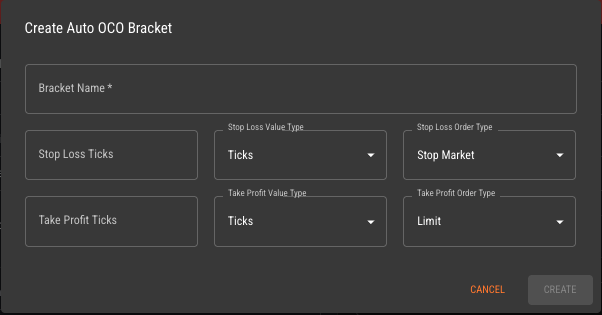
3. Setup and Save Auto OCO Bracket Setup

{% hint style="warning" %}
You must be completely flat before switching bracket types (e.g., Position Brackets vs. Auto OCOs)
{% endhint %}

<figure><img src="https://2549854448-files.gitbook.io/~/files/v0/b/gitbook-x-prod.appspot.com/o/spaces%2Ffj55gt7IahlmBVVgmbnQ%2Fuploads%2FZLcygURi8GePH7HJdsqR%2FGIF%20Recording%202025-09-21%20at%202.21.40%20PM.gif?alt=media&#x26;token=5147c5ba-bc18-4e12-b025-816b267df1ba" alt=""><figcaption></figcaption></figure>

### Customizing Your Auto OCO Brackets

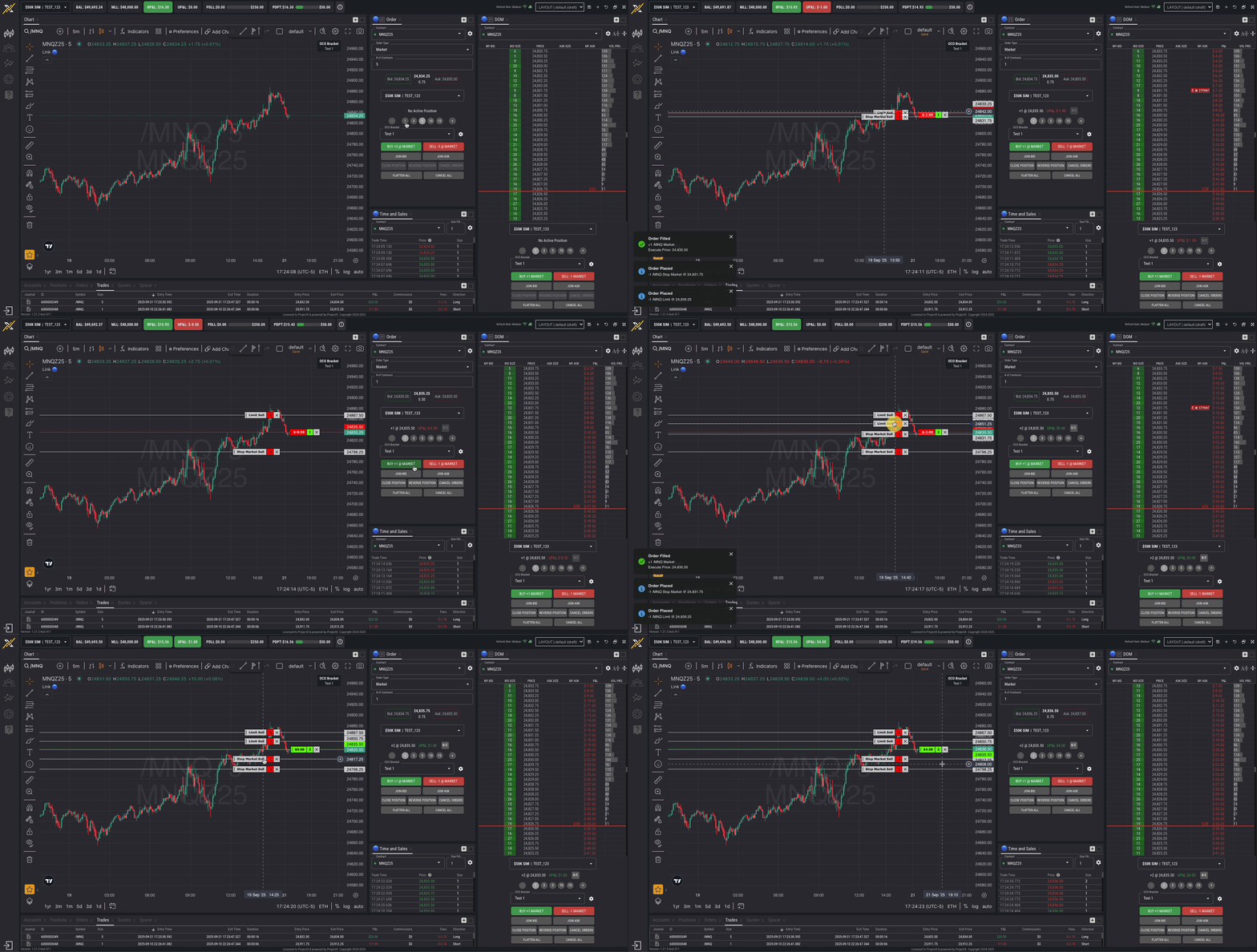
Once enabled, the Order Ticket will update with new bracket setup tools:

* Set TP/SL in ticks or $
* Drag & drop TP/SL directly on working Limit and Stop orders
* View TP/SL overlay on DOM before placing the order

<figure><img src="https://2549854448-files.gitbook.io/~/files/v0/b/gitbook-x-prod.appspot.com/o/spaces%2Ffj55gt7IahlmBVVgmbnQ%2Fuploads%2F4EXaAZ9EQD2nM3j7iGB9%2Fimage.png?alt=media&#x26;token=2da6846f-88c0-44c9-88c9-655e96e23285" alt=""><figcaption></figcaption></figure>


---

# Agent Instructions: Querying This Documentation

If you need additional information that is not directly available in this page, you can query the documentation dynamically by asking a question.

Perform an HTTP GET request on the current page URL with the `ask` query parameter:

```
GET https://help.topstepx.com/settings/risk-settings/auto-oco-brackets.md?ask=<question>
```

The question should be specific, self-contained, and written in natural language.
The response will contain a direct answer to the question and relevant excerpts and sources from the documentation.

Use this mechanism when the answer is not explicitly present in the current page, you need clarification or additional context, or you want to retrieve related documentation sections.